
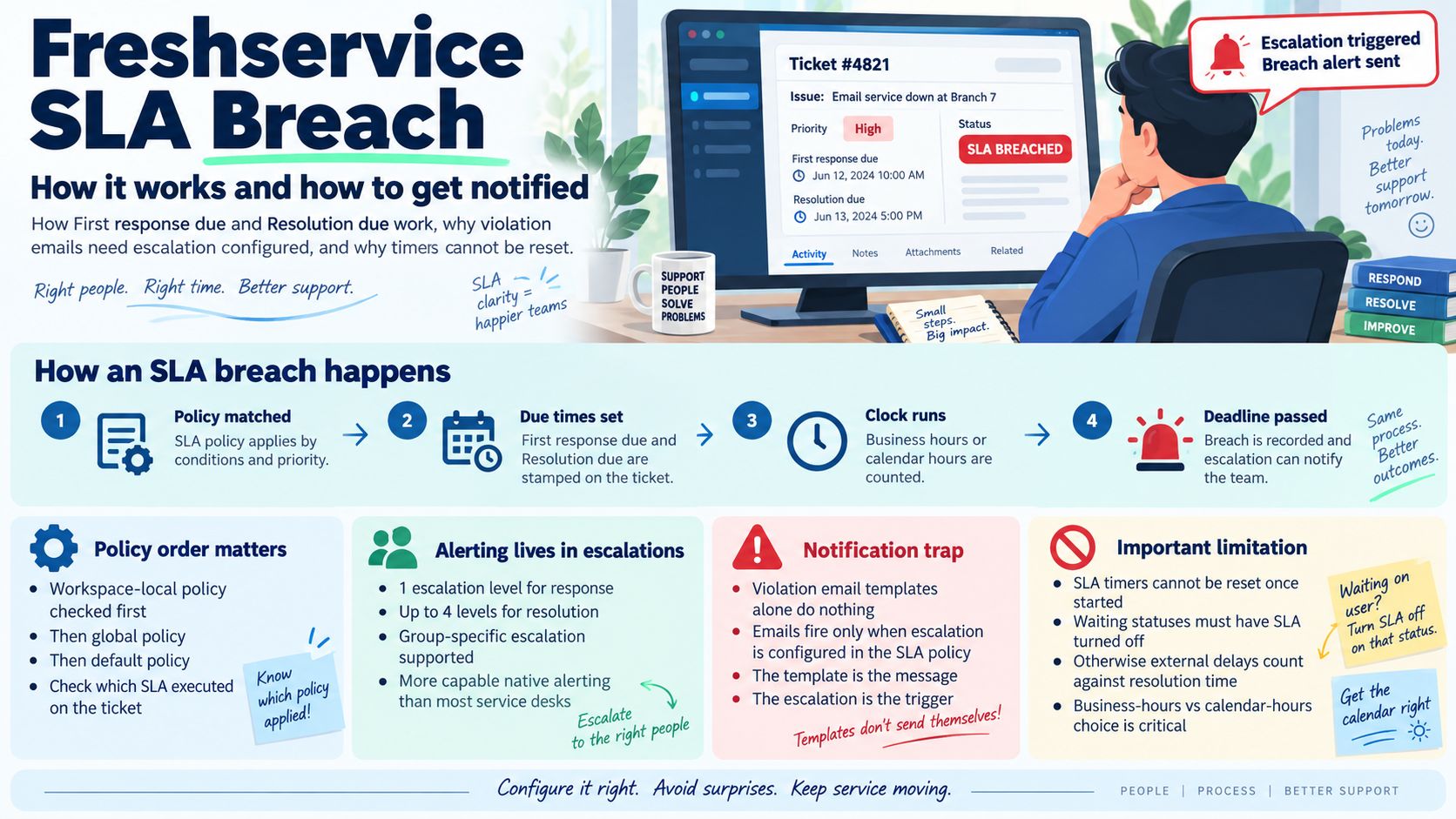
Freshservice has the most capable native SLA escalation of the mainstream service desks and the least flexible clock. Both facts matter, and the second one surprises teams migrating in from a tool where the timer could be paused at will.
A Freshservice SLA breach happens when a ticket passes the First response due or Resolution due time set by the SLA policy that matched it. Alerting is built into the policy itself as escalations — one level for response and up to four for resolution. The common trap: the SLA violation email templates exist under Admin, but they only ever fire if escalation is configured in the SLA policy first.
How Freshservice Decides a Ticket Has Breached
An SLA policy in Freshservice sets, for each priority, a response time and a resolution time, and whether those are counted in business hours or calendar hours. From that it stamps two values on every incoming ticket: First response due and Resolution due. Passing either is a breach of that clock.
Priorities are Urgent, High, Moderate and Low, and targets are set per priority. The calendar choice is the one people get wrong most often — a business-hours team running a calendar-hours policy breaches overnight and at weekends, automatically, with nobody at fault.
Which Policy Actually Applied
If your account uses workspaces, three tiers of policy exist and they resolve in a fixed order. Freshservice checks the workspace-local policies first; if no local policy’s conditions match, it falls through to the global policy; if that does not apply either, the default policy takes the ticket.
This matters when a deadline looks wrong. The question is never just “what does our SLA say” but “which of the three policies claimed this ticket”. You can check directly: open the ticket and it shows which SLA was executed on it.
Escalations Are Where the Alerting Lives
Unlike tools that bolt breach alerting onto a general automation engine, Freshservice puts it inside the SLA policy. When you define the policy you also define who gets escalated to, and after how long.
You get one level of escalation for ticket response and up to four levels for ticket resolution. Escalation can also be made group-specific, so each group escalates to an agent within that group rather than to a single central owner.
Four resolution levels is genuinely more than most service desks offer natively, and it maps well onto a real escalation path — agent, lead, manager, service owner — without building anything.
The Notification Trap
This is the single most common Freshservice SLA complaint, and it is a configuration dependency rather than a bug.
Under Admin → Email Notifications → Agent Notification there are templates called First Response SLA and Resolution time SLA. You can edit them, they look enabled, and they will never send anything on their own. Freshservice states the condition plainly: these notifications work only when ticket escalations are configured in your SLA policy.
So if you have switched the templates on and heard nothing, the fix is not in the notification screen at all — go back to the SLA policy and add the escalation levels. The template is the message; the escalation is the trigger.
Timers Cannot Be Reset
Freshservice is explicit that SLA timers cannot be reset once started, because they track from ticket creation. There is no “restart the clock” action to reach for when a ticket is reclassified or reopened.
Pausing works differently from the pause conditions you may be used to. To stop a metric counting, you configure a custom status through the endpoint map and turn the SLA off for that status. Resolution time then excludes any period the ticket spent in a status where the SLA was disabled.
The practical consequence is that your waiting on user and waiting on vendor statuses are load-bearing. If they do not have the SLA turned off, every delay caused by someone outside your team counts against your resolution target.
Checking Whether a Ticket Breached
For a single ticket, open it and look at the Activity section, then find the First response entry — it records whether the SLA was met or violated. The ticket also shows the Due by times on the right, and which SLA policy ran.
How This Compares
Pre-breach alerting is where the three mainstream service desks diverge most:
| Tool | Native warning before breach |
|---|---|
| Freshservice | Yes — escalation levels inside the SLA policy itself. |
| Jira Service Management Cloud | Yes — an SLA threshold breached trigger with a configurable offset. |
| Jira Service Management Data Center | No — scheduled JQL filter subscriptions instead. |
| Zendesk | No — hourly automations only, never at the deadline. |
Why Freshservice SLAs Breach
In rough order of how often each is the real cause:
- The wrong policy matched. A workspace-local policy quietly took the ticket before the global one you were looking at.
- Calendar hours instead of business hours. The clock runs all night against a team that does not.
- Waiting statuses still count. The SLA was never turned off for them, so customer delay is recorded as your delay.
- No escalation configured. The breach happened and nobody was told, because the notification had no trigger behind it.
- Priority set late. Targets follow priority, so a ticket triaged an hour after creation spends that hour on the wrong clock — and the timer cannot be reset afterwards.
As with SLA breaches in any ticketing system, these are configuration problems well before they are speed problems.
In Short
Freshservice gives you escalation depth that most tools make you build yourself, and takes away the ability to reset or freely pause a clock. Get the business-versus-calendar-hours choice right, turn the SLA off on every waiting status, and configure escalation in the policy — otherwise the violation emails you switched on will sit there doing nothing.
Where InfraCue Fits
Full disclosure: this guide is published by InfraCue, which competes with Freshservice. Freshservice is the closest comparison of the three tools in this series — both are ITSM rather than customer support, and its four-level resolution escalation is genuinely stronger than most service desks offer natively.
The differences are scope and price. InfraCue puts device health monitoring beside tickets, SLA clocks, asset lifecycle, spares inventory and a NOC wallboard in a single console rather than spread across modules and plan tiers, and treats locations as first-class — tickets route by location, assets belong to one, dashboards filter per branch. It is priced in INR from ₹2,999 per month with a 30-day trial and no credit card, which for an Indian IT team is usually the deciding difference.
This guide is maintained by InfraCue, an IT operations platform with ticketing, SLA tracking and device monitoring in one console. It documents Freshservice behaviour as described in Freshworks’ own documentation and is not affiliated with Freshworks.