
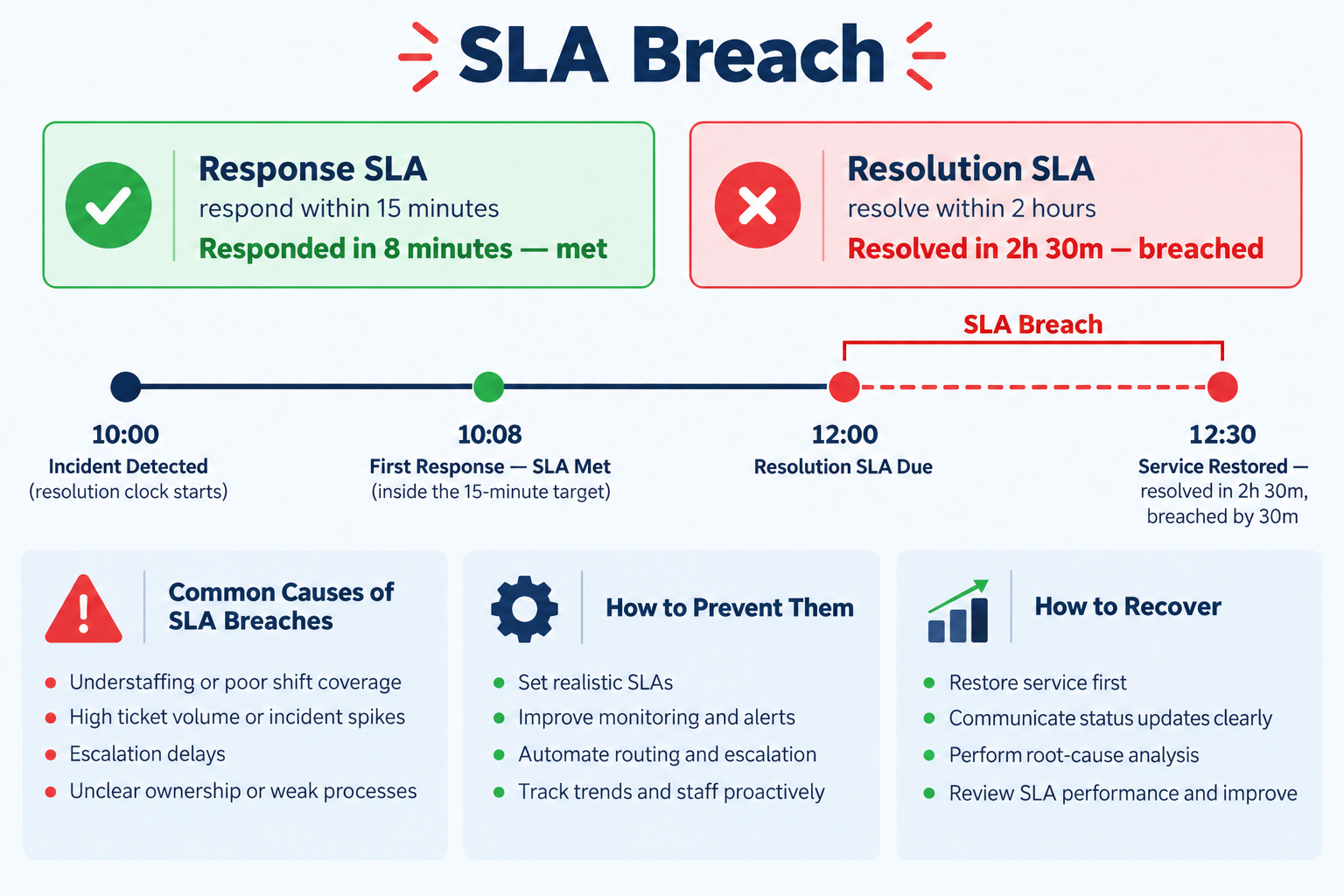
An SLA breach is the moment a support ticket crosses the deadline you promised for it. It sounds like a reporting detail. In practice it's the clearest signal you have that something in your IT operation — routing, priorities, staffing, or the targets themselves — is out of step with reality.
An SLA breach happens when a ticket passes an agreed target without the required action being taken. Most systems track two separate targets, so there are two distinct breaches: a response breach (nobody acknowledged the ticket in time) and a resolution breach (the issue wasn't fixed in time). A ticket can meet the first and breach the second. Fixing breaches is rarely about working faster — it's about correct priorities, correct routing, and targets that reflect what your team can actually do.
What Is an SLA Breach?
A Service Level Agreement sets measurable promises about support: how quickly someone will respond, and how quickly the issue will be resolved. Those promises are usually expressed in minutes or hours and vary by priority — a Critical incident might carry a 15-minute response target while a Low request carries eight hours.
A breach occurs when the clock on one of those targets runs out before the required action happens. Concretely: if your policy says Critical tickets get a response within 15 minutes, and a Critical ticket sits untouched for 20, the response SLA is breached — regardless of how quickly it's fixed afterwards.
Two things follow from this that people often miss:
- A breach is a fact, not a judgement. It doesn't mean anyone was careless. It means a deadline passed. The useful work starts with asking why.
- A breach is only as meaningful as the target behind it. If your targets were set optimistically in a workshop and never revisited, a "breach" may simply mean the target was wrong.
Response Breach vs Resolution Breach
Most ticketing systems run two independent clocks per ticket, and conflating them is the single most common source of confused SLA reporting.
| Response SLA | Resolution SLA | |
|---|---|---|
| Measures | Time until a human first acknowledges or acts on the ticket | Time until the underlying issue is actually fixed |
| Typical target | Minutes | Hours or days |
| Usually breached because | Nobody was watching the queue, or the ticket was routed to the wrong person | The fix genuinely takes longer, or the ticket stalled waiting on someone |
| Fix pattern | Routing and queue ownership | Capacity, escalation paths, realistic targets |
Response clock
Responded at 8 min — met
Resolution clock
Resolved at 5 hrs 10 min — breached by 1 hr 10 min
If you search your reports for "resolution SLA violated" and find a long list while response times look healthy, that's diagnostic: your team is picking work up promptly but something downstream is stalling it. That's a very different problem from nobody noticing tickets at all.
SLA Violated vs SLA Breached: What the Labels Mean
An SLA violation and an SLA breach are the same event. Both mean a target passed without the required action happening. Some ticketing tools write the state as Violated and others as Breached; the word is a product decision, not a difference in severity, consequence or contractual weight.
What does carry meaning is which clock the label is attached to:
- First response SLA violated. Nobody replied inside the response target. The ticket may still be resolved comfortably on time — this clock stops independently of the other one.
- Resolution SLA violated. The fix did not land inside the resolution target. Someone may have replied within seconds; that does not rescue this clock.
There is a practical trap worth knowing before you report on SLA violations. Searching your ticket history for “breached” in a system that writes “violated” returns nothing at all, and more than one team has concluded it had no SLA problem on exactly that basis. Check which word your tool actually writes before you trust the count. InfraCue records the state as Breached, alongside Met and Paused.
Breached, At Risk, or Paused?
A well-designed system distinguishes several states, and treating them all as "late" hides the signal you actually need.
| State | Meaning | What to do |
|---|---|---|
| On track | Within target, clock running | Nothing |
| At risk / near breach | Approaching the deadline with no resolution | This is the only state where intervention still prevents a breach |
| Paused | Waiting on the requester, an approval, or a vendor | Nothing — but verify the clock genuinely stopped |
| Breached | Deadline passed without resolution | Communicate, then diagnose the cause |
| Met | Completed within target | Nothing |
Deadline stays fixed — “paused” is only a label
Resolved after 5 hrs elapsed — reported as breached
Deadline moves by the time spent waiting
Same work, same waiting — correctly reported as met
Why SLA Breaches Actually Happen
In internal IT teams, breaches cluster around a small number of causes. In rough order of how often they're the real culprit:
- The ticket was mis-prioritised. Priority usually determines the target, so a request logged as Critical when it's routine will breach a target it was never meant to carry — and vice versa.
- It went to the wrong queue or the wrong engineer. The clock starts at creation, not at the point someone qualified finally sees it. Every handoff is dead time against the target.
- It stalled waiting on someone outside the team — the requester, an approver, a hardware vendor — and the system kept counting that time against you.
- Nobody was watching the queue at that hour. Tickets raised at 6pm against a two-hour target breach overnight unless coverage or targets account for it.
- The target was never realistic. If a category breaches consistently rather than occasionally, the target is the problem, not the team.
- The work was genuinely bigger than a ticket. Some issues are projects wearing a ticket costume, and no target will save them.
Notice that only one of these is "the team was too slow." That's the point. Chasing breach counts without diagnosing cause tends to produce faster ticket-closing rather than better IT.
How to Prevent SLA Breaches
Prevention is mostly structural. Five things move the number more than exhortation does:
1. Set targets per priority and per category, not one global rule. A password reset and a site-wide network outage should not share a resolution target. Granular targets make breaches meaningful; a single blanket target guarantees noise.
2. Make at-risk visible before it becomes breached. A breach alert is a post-mortem. An at-risk alert is an opportunity. If your team only finds out after the deadline, you have reporting, not prevention.
3. Route on creation, not on inspection. If a ticket's category and location can determine its owner automatically, the response clock stops burning while it waits to be triaged.
4. Pause honestly. Ensure waiting states genuinely stop the clock and push the deadline forward. Teams that don't do this quietly stop trusting their own SLA reports, which is worse than not measuring at all.
5. Review targets quarterly against actuals. If a category breaches more than occasionally, change the target or change the staffing. Leaving an unreachable target in place trains everyone to ignore the metric.
SLA Breach Notification Templates
When a breach happens, communicating quickly and plainly does more for trust than the breach itself does to damage it. Three templates you can adapt — deliberately short, because long apologies read as excuses.
1. To the requester, at the moment of breach
Subject: Update on [TICKET-ID] - we've missed our target

Hi [NAME],

We committed to resolving [TICKET-ID] ([SHORT DESCRIPTION]) by
[TARGET TIME], and we haven't. I'm sorry.

Where it stands: [ONE SENTENCE OF ACTUAL STATUS]
What happens next: [SPECIFIC NEXT ACTION] by [REALISTIC NEW TIME]
Who owns it: [NAME], and I'll update you at [TIME] either way.

[YOUR NAME]
2. Internal escalation to the IT lead
Subject: SLA breach - [TICKET-ID] - [PRIORITY]

Ticket: [TICKET-ID] - [SUBJECT]
Target: [RESPONSE/RESOLUTION] due [TIME], breached by [DURATION]
Owner: [ENGINEER]
Blocker: [WHAT IS ACTUALLY STOPPING THIS]
Support needed: [ESCALATION / VENDOR / APPROVAL / NOTHING]
3. Monthly summary to stakeholders
Subject: IT service levels - [MONTH]

Tickets resolved: [N]
Met target: [N] ([%])
Breached: [N] ([%])

Top breach cause: [CAUSE], accounting for [N] of [N] breaches.
Action taken: [SPECIFIC CHANGE - target adjusted, routing rule added,
cover extended]

Detail available on request.
Those three cover the common cases. For the harder ones — warning someone before the deadline, a second breach on the same ticket, a delay caused by a vendor or by the requester themselves, and a major incident that breaches many tickets at once — see seven SLA breach notification templates.
What to Do After a Breach
The recovery sequence that keeps credibility intact:
- Tell the requester before they ask. A breach you disclose is a process problem; a breach they discover is a trust problem.
- Give a new commitment, and make it one you'll hit. A second missed date costs far more than the first.
- Record the cause, not just the fact. A breach log with no cause field produces a number nobody can act on.
- Look for the pattern monthly, not the incident daily. One breach is noise. The same category breaching every week is a design flaw.
- Change something specific. Adjust a target, add a routing rule, extend cover. If nothing changes, the review was theatre.
How InfraCue Handles SLA Breaches
InfraCue is an IT operations platform for internal teams, and SLA governance is one of its core modules. Specifically, and only what it actually does:
- Targets are set per priority, and optionally per category and sub-category. When a ticket is raised, the most specific matching rule wins — sub-category first, then category, then the priority-level default. Each rule carries a separate response target and resolution target. How to configure SLA rules.
- Every ticket reports one of six states: On Track, Near Breach, Paused, Breached, Met, or Not Set. "Near Breach" means the resolution target is within one hour.
- The clock genuinely pauses. Moving a ticket to Waiting for User, Waiting for Approval, or Waiting for Vendor stops the timer; when it moves back, both the response and resolution deadlines are pushed forward by the time it spent waiting — working time when the rule has a schedule, elapsed time when it does not. How SLA timers and breach alerts work.
- Alerts fire at both stages. A scheduled scan emails the assigned engineer and the infra leads when a ticket is within an hour of its resolution target, and again if it breaches. Alerts are de-duplicated so the same ticket doesn't re-notify on every scan.
- Breaches are visible without running a report. The dashboard and the TV wallboard both show live breached and near-breach counts plus a breakdown of tickets by SLA state, and ticket reports can be filtered by SLA state and exported to CSV.
Targets can be counted in working time. Assign a schedule to an SLA rule and the clock only runs during your operating hours — weekday windows, holidays including annually recurring ones, and timezone-aware boundaries that hold across a daylight-saving shift. An eight-hour target raised at 17:00 on Friday falls due at 16:00 on Monday, not 01:00 on Saturday. Schedules are opt-in: leave a rule unassigned and it runs on elapsed time exactly as before.
Run InfraCue free for 30 days with your real tickets, priorities and targets. No credit card, nothing to cancel.
Start a free 30-day trialCommon Questions
Is an SLA breach the same as an SLA violation?
Yes — the terms are used interchangeably. Some tools label the state "violated" and others "breached"; both mean a target passed without the required action. You may also see "resolution SLA violated," which specifies which of the two clocks was missed.
What is an acceptable SLA breach rate?
There's no universal figure, and be sceptical of anyone who quotes one. What matters more is the trend and the concentration: a stable low-single-digit rate spread evenly is very different from the same rate concentrated in one category, which points at a specific fixable cause.
Should the SLA clock pause when waiting on the requester?
Almost always, yes — you can't be accountable for time you don't control. The important detail is whether pausing genuinely moves the deadline forward or just relabels the ticket. If deadlines stay fixed, your compliance numbers will drift steadily away from reality.
Do internal IT teams need SLAs at all if there's no contract?
The value isn't contractual. Internal SLAs give you a shared definition of "urgent," a basis for staffing decisions, and a number to answer "are we keeping up?" with something other than a feeling. That's worth having even when nobody can be penalised.
Can a ticket breach response but still meet resolution?
Yes, and it's common — a ticket nobody acknowledged for hours can still be fixed quickly once someone starts. That combination usually points at a queue-monitoring or routing gap rather than a capacity problem. See also: IT ticketing system vs. help desk software.