
Zendesk is good at measuring SLA breaches and deliberately limited at telling you about them. Understanding that split is the difference between a policy that protects your service commitments and one that only explains, after the fact, why you missed them.
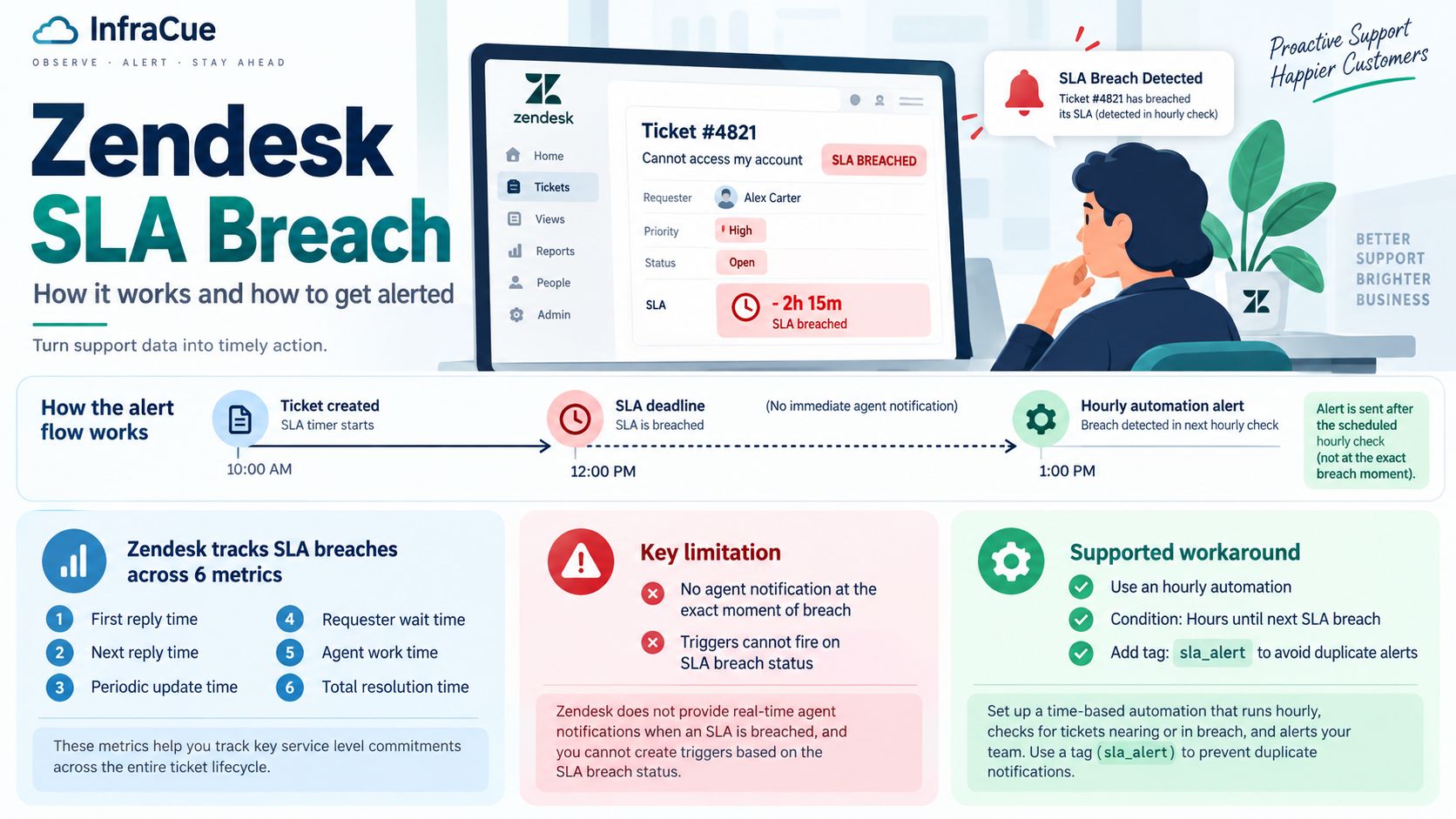
A Zendesk SLA breach happens when a ticket passes one of the targets set in its SLA policy. Zendesk records the breach reliably, but it cannot notify anyone at the moment it occurs: its own documentation states there is no way to send agent notifications based on SLA breaches, and that you cannot build triggers on SLA breach status. The supported route is a time-based automation using the Hours until next SLA breach condition — and because automations run once an hour, the alert lands within roughly an hour either side of the deadline, never at it.
How Zendesk Decides a Ticket Has Breached
A Zendesk SLA policy does not measure one thing. It measures up to six, each with its own clock and its own breach:
| Metric | What it measures |
|---|---|
| First reply time | Creation until the first public agent comment. |
| Next reply time | A customer comment until the next public agent reply. |
| Periodic update time | The gap between successive public agent comments. |
| Requester wait time | Combined time in New, Open and On-hold. Pauses while the ticket is Pending. |
| Agent work time | Time the ticket sits actively with an agent. |
| Total resolution time | Creation until the ticket is resolved. |
Group SLAs add a seventh, ownership time, which measures how long a ticket stays with one group before moving on.
Two of these behave differently from the rest, and it is the most common source of confusion. Next reply time and periodic update time measure the interval between comments, so they are evaluated repeatedly across the life of a ticket. A single long conversation can therefore breach several times. First reply time, by contrast, can only ever breach once.
This is why “how many breaches did we have?” is a harder question in Zendesk than it first appears. A count of breaches is not a count of tickets.
Requester Wait Time vs Total Resolution Time
These two look interchangeable and are not. Total resolution time runs from creation to resolution regardless of who was holding things up. Requester wait time excludes Pending, so it stops whenever you are legitimately waiting on the customer.
If your workflow parks tickets in Pending for days while a user finds a serial number or approves a change, a total resolution target will breach constantly through no fault of your team. Requester wait time usually reflects the commitment you actually made. Picking the wrong one of these produces a breach rate that looks alarming and means very little — the classic case of a target being wrong rather than a team being slow.
Why You Cannot Get an Alert at the Moment of Breach
This is the limitation that surprises people, and it is documented rather than accidental. Zendesk states plainly that there is currently no way to send notifications to agents based on SLA breaches, and separately that you cannot create triggers based on SLA or group SLA breach status.
The distinction matters. Triggers in Zendesk fire immediately on a ticket event — a comment, a status change, an assignment. Automations run on a schedule. Because breach status is not available to triggers, every breach notification has to be built as an automation, and automations are time-based by design.
The Workaround Zendesk Documents
The supported pattern uses three conditions on an automation:
- Hours until next SLA breach — Less than —
2 - Status category — Less than —
Solved - Tags — Contains none of the following —
sla_alert
The action notifies the group or user who needs to know, and also adds the sla_alert tag. That tag is doing real work: without it the automation re-fires on every pass and buries the team in duplicate warnings about the same ticket. The tag makes the alert fire once.
The companion condition, Hours since last SLA breach, handles the other side — escalating tickets that have already missed their target. Both conditions respect the schedule applied to the ticket, so business-hours policies are honoured rather than counted in wall-clock time.
Why the Hourly Limit Is the Real Constraint
Zendesk is explicit that automations run once every hour, that you cannot use intervals smaller than that, and that a notification can therefore arrive as close as the hour before or the hour after a breach — but not at the breach itself.
For a resolution target measured in days, an hour of slack is irrelevant. For a 15-minute first reply target on a Critical incident, it is useless: by the time the hourly pass runs, the target has been missed and recovered several times over. Zendesk’s SLA alerting is well suited to slow clocks and poorly suited to fast ones.
Teams that need tighter timing generally leave the automation layer entirely and push ticket events to an external system by webhook, evaluating urgency themselves. That works, but it is now a small piece of infrastructure you own and maintain, not a setting you configure.
Finding Breached Tickets
Breach data surfaces in two places, and they do not always agree at the same moment. Explore reports on SLA performance after tickets update, so a breach can be visible in reporting before it is reflected in the view you were watching. If you have ever had a report show breaches while a filtered view returns nothing, this timing gap is usually the cause rather than a broken filter.
For live work, sort a view by the SLA column so the nearest deadline sits at the top. For analysis, use Explore and segment by metric — because of the repeated-measurement behaviour described above, a breach count that does not say which metric breached is not actionable.
Reducing Breaches Rather Than Reporting Them
Most persistent breach patterns are not speed problems. In order of how often they turn out to be the cause:
- The target is wrong. A figure agreed in a workshop and never revisited, or total resolution time used where requester wait time was meant.
- The ticket started in the wrong place. Priority or group set incorrectly at creation means the wrong policy applies for the whole life of the ticket.
- The schedule is wrong. A policy running on a 24/7 calendar for a team that works business hours will breach every night, automatically.
- Nobody owns the queue. First reply breaches concentrated at particular times of day are a staffing pattern, not an individual performance problem.
A breach is a fact, not a verdict. The useful question is always which clock breached and what the ticket was waiting on — the same diagnostic logic that applies to SLA breaches in any ticketing system, whichever tool records them.
In Short
Zendesk’s SLA measurement is solid and more granular than most teams use. The gap is in the alerting path: breach status is unavailable to triggers, so every warning is an hourly automation, and fast targets outrun it. Set your targets against the right metric, use the Hours until next SLA breach automation with a deduplicating tag, and accept that for anything measured in minutes you will need something outside Zendesk watching the clock.
Where InfraCue Fits
Full disclosure: this guide is published by InfraCue, so what follows is positioning rather than a neutral recommendation. Zendesk is built for customer support and is good at it. The gap shows when a ticket exists because something in your infrastructure failed — the device that caused it lives in a different system, and joining the two back together is manual work.
InfraCue keeps device health, tickets, SLA clocks, asset records, spares inventory and a NOC wallboard in one console. Locations are first-class: tickets route by location, assets belong to one, and dashboards filter per branch. Pricing is in INR from ₹2,999 per month with a 30-day trial and no credit card — which is the practical difference for an Indian IT team currently paying US list price for a service desk.
This guide is maintained by InfraCue, an IT operations platform with ticketing, SLA tracking and device monitoring in one console. It documents Zendesk’s behaviour as described in Zendesk’s own documentation and is not affiliated with Zendesk.